Merging LoRA Adapters and Serving Locally
In the SFT and DPO posts, I trained LoRA adapters using pure PyTorch. The adapters are tiny (~4MB), but at inference time you still need to load the base model, inject the LoRA wrappers, and load the adapter weights. What if you just want a single, standalone model you can run anywhere?
Merging folds the adapter back into the base weights permanently. The result is a standard model file with no adapter machinery required.
Why Merge?
During training, LoRA keeps the base weights frozen and stores the adaptation as separate low-rank matrices. The forward pass computes:
Merging does the matrix addition once and throws away the adapter:
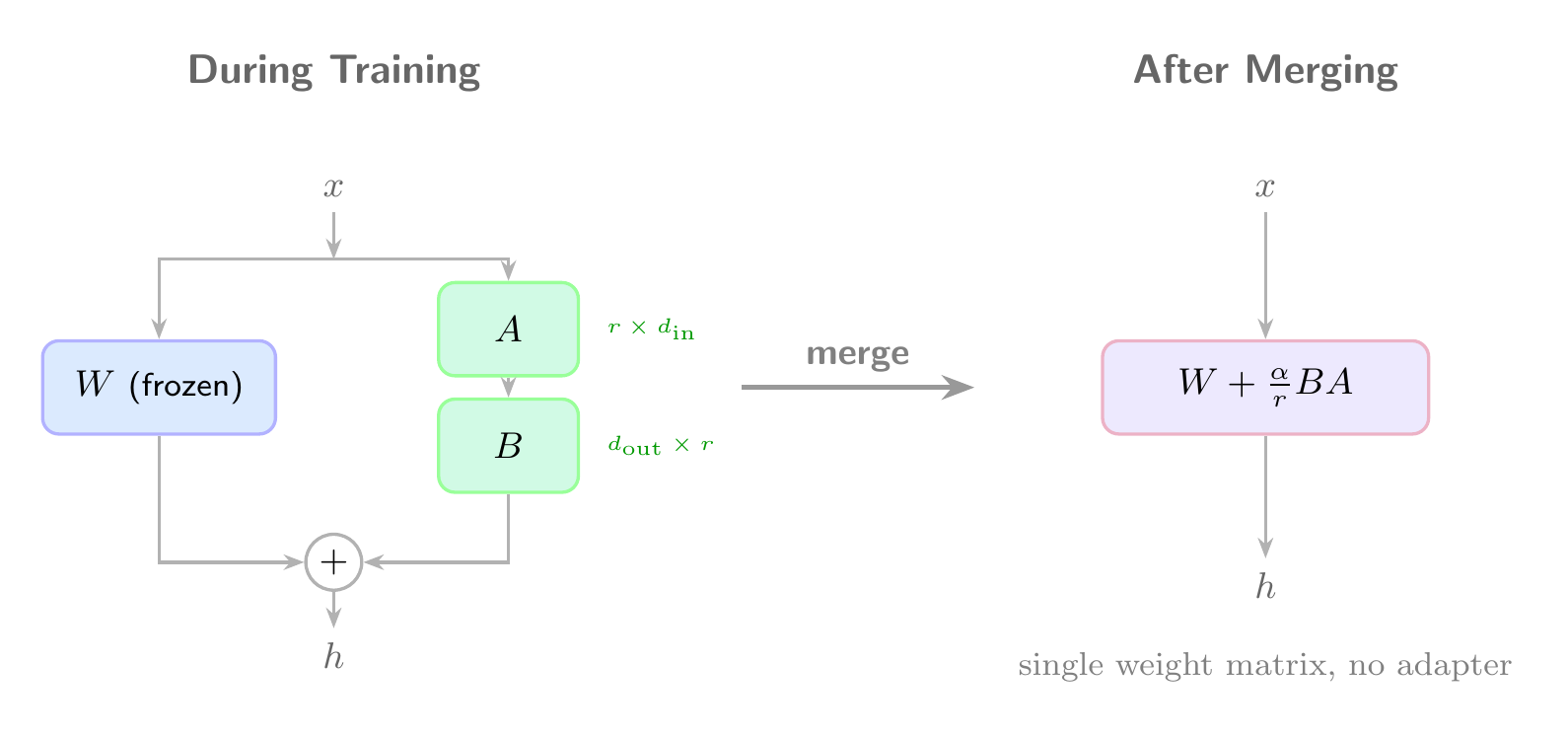
After merging, inference is just a standard forward pass through the merged weights. No LoRALinear wrappers, no adapter loading.
Merging in Pure PyTorch
Since we built our own LoRALinear in the SFT post, merging is straightforward. We walk the model, find every LoRALinear module, compute the merged weight, and replace it with a plain nn.Linear:
1 | import torch |
The shape math: our LoRALinear.forward computes (x @ A @ B) * scale, which is equivalent to adding scale * B^T @ A^T to the original weight matrix (since nn.Linear stores weights transposed).
Using It
1 | from transformers import AutoModelForCausalLM, AutoTokenizer |
Verifying the Merge
A quick sanity check: the merged model should produce identical output to the LoRA model:
1 | prompt = "### Instruction:\nDescribe Go in structured format.\n\n### Response:\n" |
Both produce:
1 | {"name": "Go", "category": "programming language", "features": ["dynamic typing", "interpreter"]} |
Size Comparison
| Artifact | Size |
|---|---|
| LoRA adapter | 4.3 MB |
| Merged model (fp32) | 4.1 GB |
| Base model (fp16, from HF cache) | 2.1 GB |
The adapter is ~500x smaller than the full model. Once merged, the model is the same shape as the base (same number of parameters), just with slightly different values. The merged model is 4.1GB because we saved in float32. Converting to float16 or quantizing brings it back down.
Serving Locally
Once merged, you can serve the model with a simple interactive loop:
1 | model = AutoModelForCausalLM.from_pretrained("output/merged", dtype="auto") |
Converting to GGUF for llama.cpp / Ollama
For faster local inference, you can quantize the merged model to GGUF format:
1 | # Convert and quantize to 8-bit |
Quantization to Q8 roughly halves the model size (~1GB for TinyLlama) with minimal quality loss. Q4 gets you to ~600MB with more noticeable degradation. I will cover quantization in more detail in a future post.
When to Merge vs. Keep Separate
Keep adapters separate when:
- You have multiple adapters for different tasks and want to swap them
- You are still iterating on training
- Storage matters (4MB vs 4GB)
Merge when:
- You want a single deployable model
- You need compatibility with runtimes that do not support custom LoRA wrappers (llama.cpp, vLLM, TGI)
- You are done training and want to ship
References
- Hu, E. J., et al. “LoRA: Low-Rank Adaptation of Large Language Models.” ICLR 2022. arXiv:2106.09685
- llama.cpp: C/C++ inference engine with GGUF conversion and quantization support.
- Ollama: Local LLM runner that uses GGUF models.
- The full code for this post is available at github.com/mrrostam/blog-code/merge